Hoe kun je met VoipBuster via een SIP apparaat
Om te kunnen bellen via ons netwerk heeft u allereerst een VoipBuster account nodig, een gebruikersnaam en wachtwoord dus. download dus ons programma vanaf de website en installeer deze.
U kunt VoipBuster gebruiken bij de volgende soorten SIP apparaten::
- SIP ATA (Analoge Telefoon Adapter)
- SIP Router
- xDSL Modem
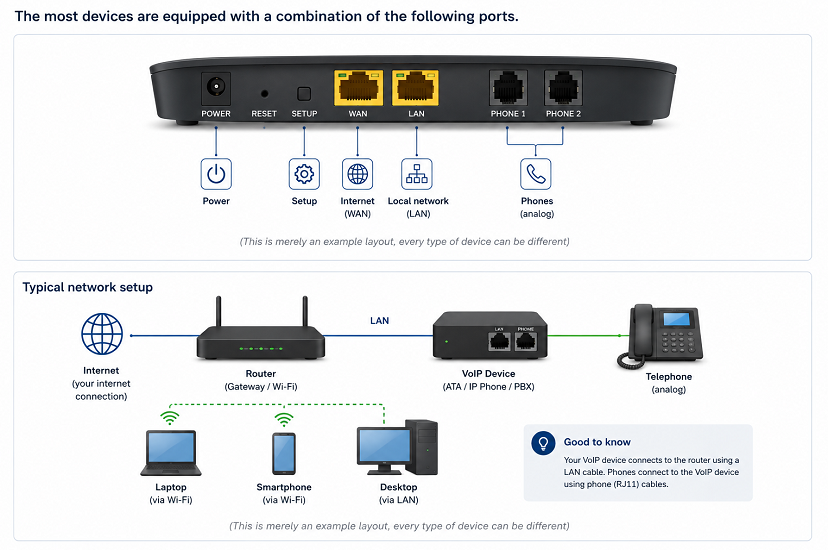
De meeste apparaten hebben een combinatie van de volgende poorten
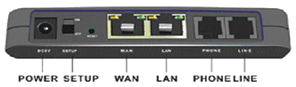
(dit is slechts een voorbeeld schema, elk type apparaat is anders)
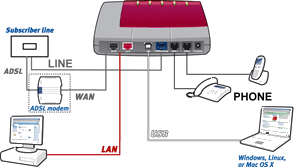
(dit is slechts een voorbeeld schema, elk type apparaat is anders)
- (A)DSL: Sluit de lijn van uw (A)DSL provider aan (niet beschikbaar op de ATA)
- WAN: sluit de lijn van uw xDSL modem/router aan
- LAN: poort voor uw (thuis) netwerk, u kunt hierop bijv. uw PC, laptop, netwerkprinter of draadloos modem aansluiten.
- PHONE: hier kunt u uw analoge telefoon op aansluiten
- LINE: hier kunt u uw analoge (PSTN) telefoonlijn op aansluiten
- USB: hier kunt u uw PC of laptop met een vrije USB poort aansluiten
Sommige SIP apparaten hebben meer dan een LAN poort en/of PHONE poort.
Voor de hardware aansluitingen vanaf uw SIP apparaat kunt u bovenstaande informatie gebruiken en de informatie in de gebruiksaanwijzing van het betreffende apparaat. Na het aansluiten van de hardware is het tijd om de software te installeren en te configureren op de juiste wijze.
Software configuratie
Algemeen |
|
|---|---|

|
SIP port : 5060 |
|
|
Registrar : sip.voipbuster.com |
|
|
Proxy server : sip.voipbuster.com |
|
|
Outbound proxy server : leeg laten |
|
Account name : uw VoipBuster gebruikersnaam (username) |
|
Password : uw VoipBuster password (wachtwoord) |
|
Display name/number : uw VoipBuster gebruikersnaam (username) of voip telefoonnummer |
|
Stunserver (option) : stun.voipbuster.com |
|
ONLY select codec G711 a-Law as active codec. All other available codecs should NOT be selected as active. |
Onderstaand vindt u een aantal voorbeelden van de software configuratie van veel gekochte SIP apparaten. We raden u aan ook de gebruiksaanwijzing van uw SIP apparaat te raadplegen.
-
(click here to expand)AVM Fritz!box FON 7050
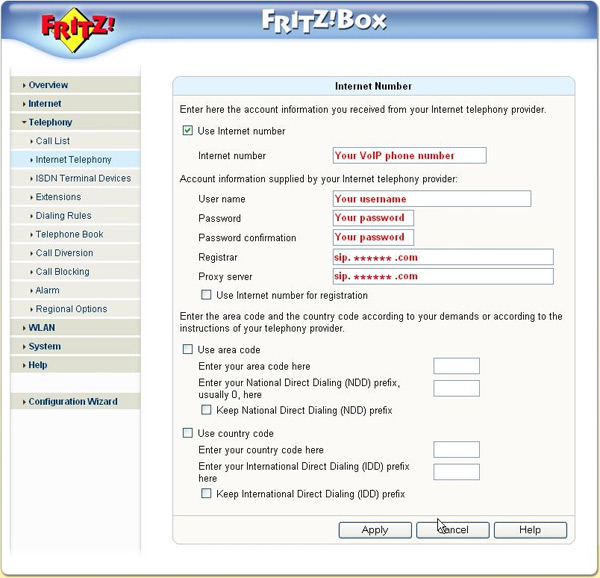
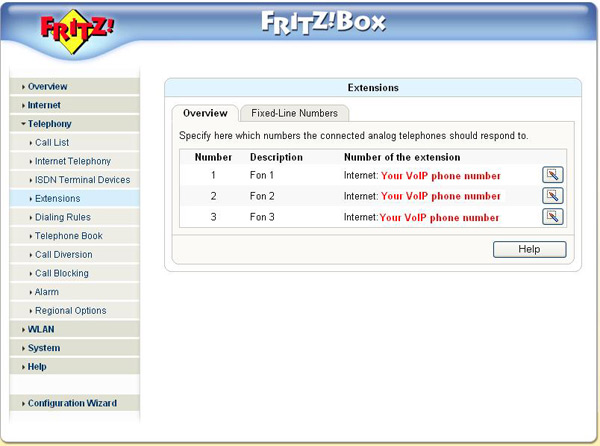
Fill in the following settings: -
 Internet number: your VoipBuster username (if available)
 -
User Name: fill in your username, this is the username you used for the registration of your VoipBuster-account
-
Password: fill in your password, this is the password you used for the registration of your VoipBuster-account
-
Password confirmation: fill in your password again
-
Registrar: this is sip.voipbuster.com
-
Proxy server: this is sip.voipbuster.com
-
Overview - number 1, 2 or 3: your VOIP phone number (if available)
-
-
(click here to expand)GRANDSTREAM HT286
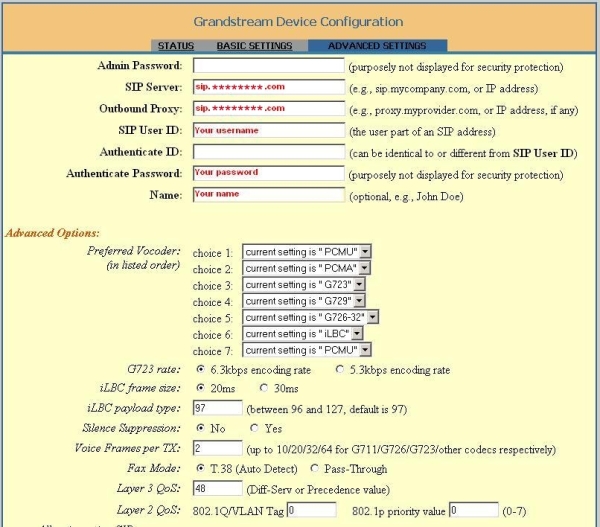
Fill in the following settings: -
SIP server : fill in sip.voipbuster.com
-
Outbound proxy : this is sip.voipbuster.com
-
SIP User ID : fill in your username, this is the username you used for the registration of your VoipBuster-account
-
Authenticate Password : your password, this is the password you used for the registration of your VoipBuster-account
-
Name : you can fill-in your name, this name will be displayed in the phone screen of the person you are calling
-
Don't change the Advanced Options
-
-
(click here to expand)GRANDSTREAM HT386
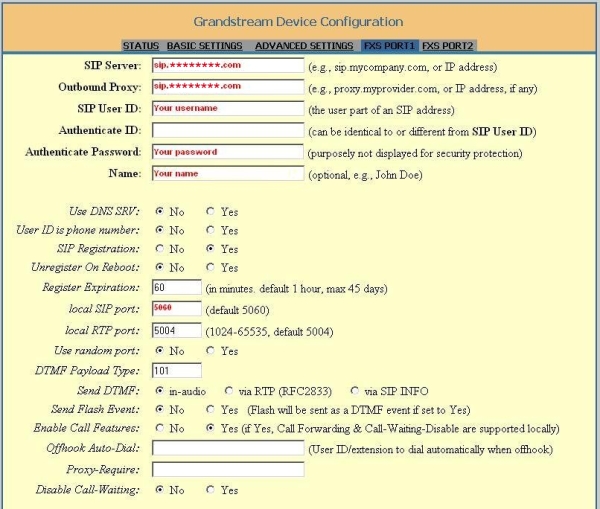
Fill in the following settings: -
SIP Server : fill in sip.voipbuster.com
-
Outbound Proxy : this is sip.voipbuster.com
-
SIP User ID : fill in your username, this is the username you used for the registration of your VoipBuster-account
-
Authenticate Password : your password, this is the password you used for the registration of your VoipBuster-account
-
Name : your name, this name will be displayed in the phone screen of the person you are calling
-
Local SIP port : fill in 5060
-
Don't change the other options
-
-
(click here to expand)GRANDSTREAM HT486
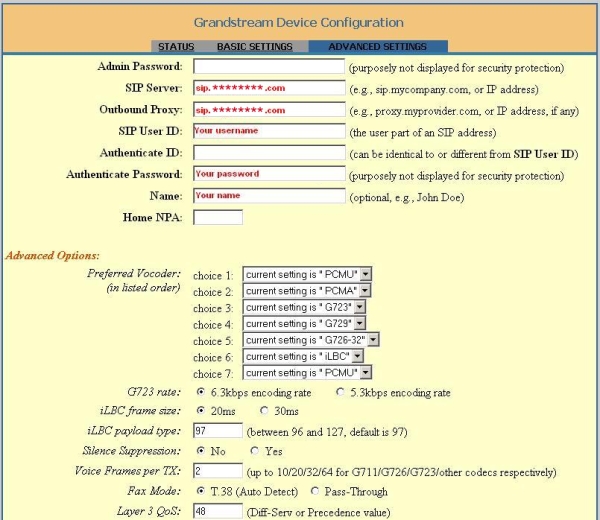
Fill in the following settings: -
SIP Server : fill in sip.voipbuster.com
-
Outbound Proxy : this is sip.voipbuster.com
-
SIP User ID : fill in your username, this is the username you used for the registration of your VoipBuster-account
-
Authenticate Password : your password, this is the password you used for the registration of your VoipBuster-account
-
Name : you can fill-in your name, this name will be displayed in the phone screen of the person you are calling
-
Don't change the Advanced Options
-
-
(click here to expand)GRANDSTREAM HT496
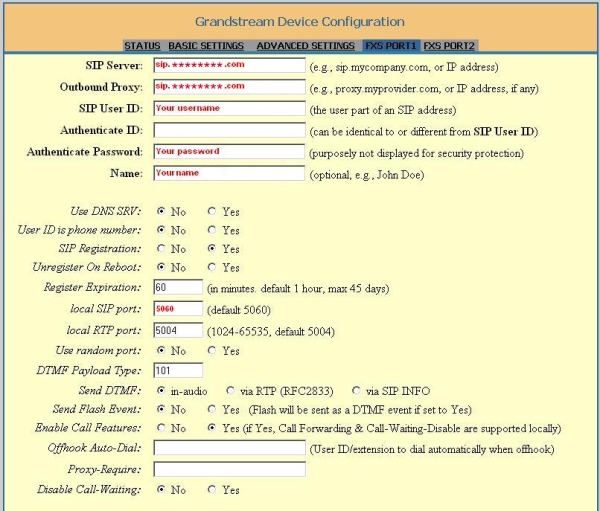
Fill in the following settings: -
SIP server : fill in sip.voipbuster.com
-
Outbound Proxy : this is sip.voipbuster.com
-
SIP User ID : fill in your username, this is the username you used for the registration of your VoipBuster-account
-
Authenticate Password : your password, this is the password you used for the registration of your VoipBuster-account
-
Name : your name, this name will be displayed in the phone screen of the person you are calling
-
Local SIP port : fill in 5060
-
Don't change the other options
-
-
(click here to expand)LINKSYS SPA3102
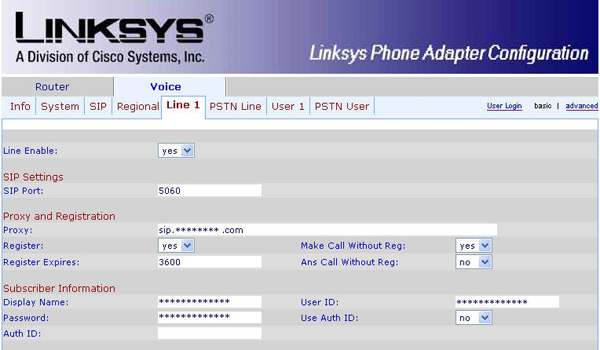
Fill in the following settings: -
Line Enable: Yes
-
SIP Port : portnumber 5060
-
Proxy: fill in sip.voipbuster.com
-
Register: this is 'Yes'
-
Make Call Without Reg: fill in 'Yes'
-
Register Expires: this is 3600 seconds
-
Ans Call Without Reg: fill in 'No'
-
Display name: you can fill-in your name, this name will be displayed in the phone screen of the person you are calling
-
User ID: fill in your username, this is the username you used for the registration of your VoipBuster-account
-
Password: fill in your password, this is the password you used for the registration of your VoipBuster-account
-
Use Auth ID: set to 'No'
-
-
(click here to expand)LINKSYS WIP330
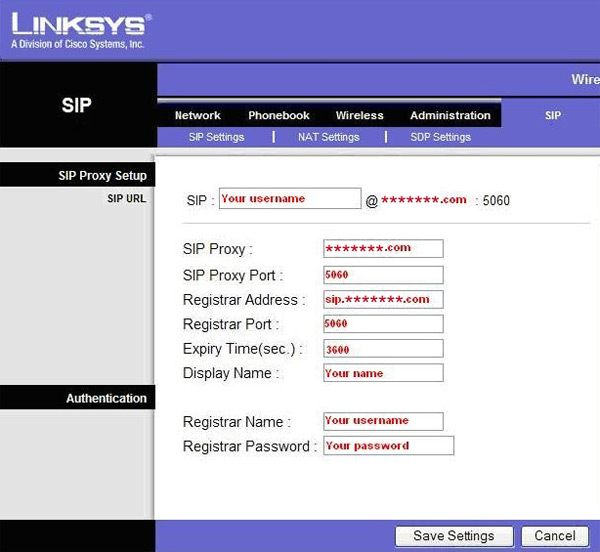
Fill in the following settings: -
SIP Proxy: fill in voipbuster.com
-
SIP Proxy Port: this is port number 5060
-
Registrar Address: this is sip.voipbuster.com
-
Registrar Port: this is port number 5060
-
Expiry Time(sec): this is 3600 seconds
-
Display name: you can fill-in your name, this name will be displayed in the phone screen of the person you are calling
-
Registrar Name: your username, this is the username you used for the registration of your VoipBuster-account
-
Registrar Password: your password, this is the password you used for the registration of your VoipBuster-account
-
-
(click here to expand)SIEMENS SX553
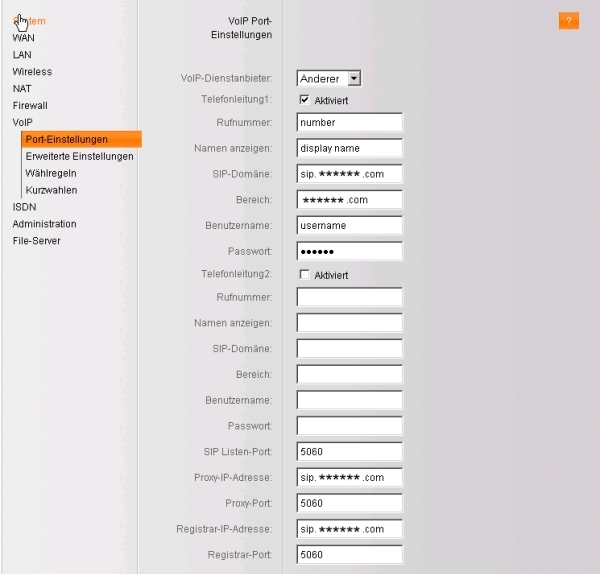
Fill in the following settings: -
Rufnummer : your VoipBuster username
-
Namen anzeigen : you can fill in your name
-
SIP-Domäne : fill in sip.voipbuster.com
-
Bereich : this is voipbuster.com
-
Benutzername : fill in your username, this is the username you used for the registration of your VoipBuster-account
-
Passwort : fill in your password, this is the password you used for the registration of you VoipBuster-account
-
SIP Listen-Port : this is port 5060
-
Proxy-IP-Adresse : fill in sip.voipbuster.com
-
Proxy-Port : this is port 5060
-
Registrar-IP-Adresse : sip.voipbuster.com
-
Registrar-Port : this is port 5060
-
-
(click here to expand)SMC 7908 VoWBRA
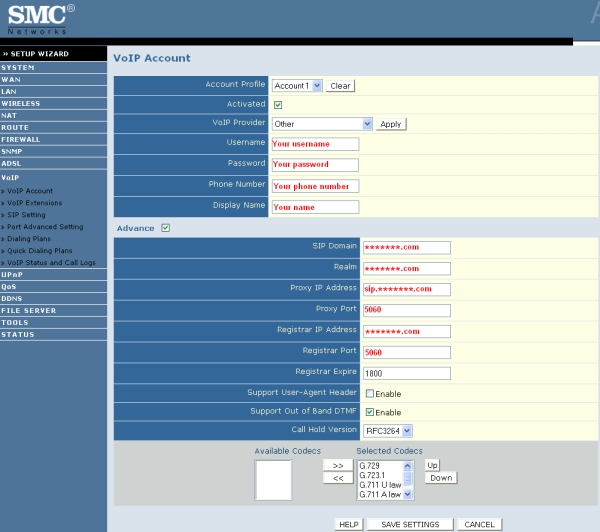
Fill in the following settings: -
Username : fill in your username, this is the username you used for the registration of your VoipBuster-account
-
Password : fill in your password, this is the password you used for the registration of your VoipBuster-account
-
Phone Number : your VoipBuster username
-
Display Name : you can fill in your name
-
SIP Domain : this is voipbuster.com
-
Realm : fill in voipbuster.com
-
Proxy IP Address : this is sip.voipbuster.com
-
Proxy Port : this is port 5060
-
Registrar IP Address : this is voipbuster.com
-
Registrar Port : this is port 5060
-
-
(click here to expand)X-lite v3.0 Software
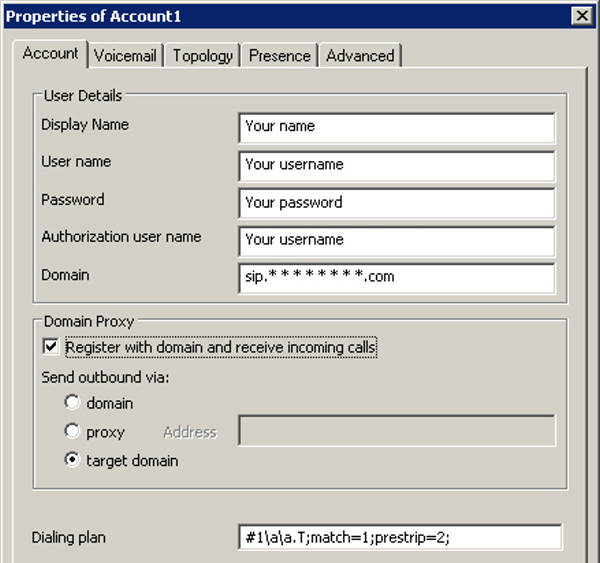
Fill in the following settings: -
Display Name : fill in your your name, this name will be displayed in the phone screen of the person you are calling
-
User name : fill in your username, this is the username you used for the registration of your VoipBuster-account
-
Password : fill in your your password, this is the password you used for the registration of your VoipBuster-account
-
Authorization user name : same as User name
-
Domain : fill in sip.voipbuster.com
-
-
(click here to expand)AVM Fritz!box FON ATA 1020
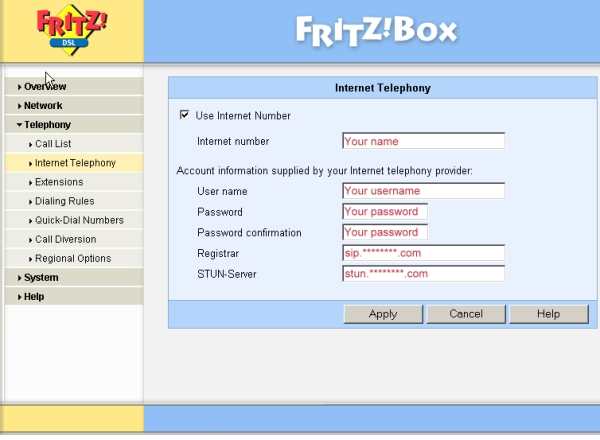
Fill in the following settings: -
Internet number: you can fill-in e.g. your name or telephone number
-
User name: fill in your username, this is the username you used for the registration of your VoipBuster-account
-
Password: fill in your password, this is the password you used for the registration of your VoipBuster-account
-
Password confirmation: fill in your password again
-
Registrar: this is sip.voipbuster.com
-
STUN-Server: this is stun.voipbuster.com
-












|
Codecs |
|
|
G.711 (64 kbps) |
|
G.726 (32 kbps) |
|
G.729 (8 kbps) |
|
G.723 (5.3 & 6.3 kbps) |
|
GSMFR (13.2 kbps) |
Bij een probleem met het geluid:
Gebruik een STUN server (bijv. stun.voipbuster.com) met poort 3478 (indien deze door uw apparaat wordt ondersteunt)
Gebruik de G.711 codec