Cómo usar VoipBuster con su dispositivo SIP
Necesita un nombre de usuario y una clave VoipBuster para poder realizar llamadas a través de nuestra red. Así que primero deberá suscribirse a VoipBuster descargando e instalando la aplicación y creando su inicio de sesión.
Puede usar VoipBuster con los siguientes tipos de dispositivos Sip:
- SIP ATA (adaptador telefónico analógico)
- SIP Router
- xDSL Modem
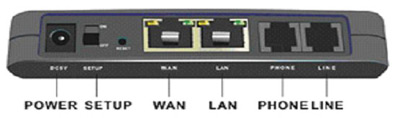
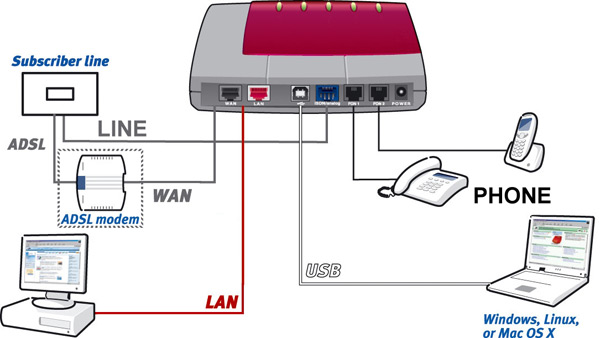
La mayoría de dispositivos disponen de una combinación de los siguientes puertos.
Ésta es sólo una disposición de ejemplo; cada tipo de dispositivo puede ser distinto)
(Ésta es sólo una disposición de ejemplo; cada tipo de dispositivo puede ser distinto)`
- (A)DSL: conecte la línea de su proveedor de (A)DSL (no disponible en un ATA).
- WAN: conecte la línea de su módem/router xDSL.
- LAN: puerto para su red (doméstica); p. ej., puede conectar su PC, portátil, impresora de red o router inalámbrico.
- PHONE: aquí puede conectar su teléfono analógico.
- LINE: conecte su línea de teléfono analógica (RTPC).
- USB: puede conectar un PC o portátil con un puerto USB libre.
Algunos dispositivos SIP tienen más de un puerto LAN y/o puerto de TELÉFONO disponibles.
Para las conexiones de hardware de su dispositivo SIP consulte la información anterior y su manual de usuario. Después de conectar el hardware debe comprobar que su software esté instalado y configurado correctamente.
Configuración del software
General |
|
|---|---|

|
Puerto SIP : 5060 |
|
|
Registro : sip.voipbuster.com |
|
|
Servidor proxy : sip.voipbuster.com |
|
|
Servidor proxy de salida : dejar en blanco |
|
Nombre de cuenta : su nombre de usuario VoipBuster |
|
Clave : su clave VoipBuster |
|
Mostrar nombre/número : su nombre de usuario o número VoipBuster |
|
Servidor Stun (opcional) : stun.voipbuster.com |
|
SOLO selecciona el códec G711 a-Law como códec activo. Todos los demás códecs disponibles NO deben seleccionarse como activos. |
A continuación hay algunos ejemplos de configuración del software de varios dispositivos SIP habituales. Por favor, consulte también el manual de su dispositivo SIP
-
(click here to expand)AVM Fritz!box FON 7050
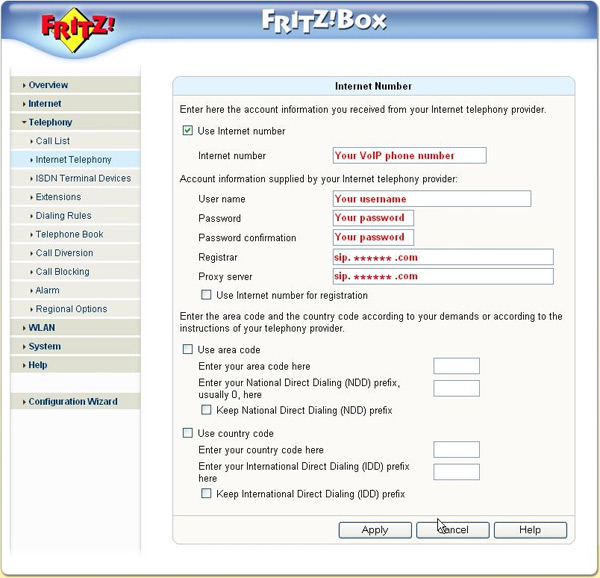
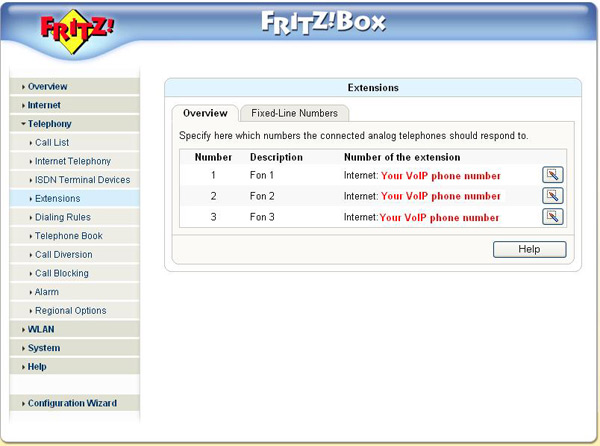
Fill in the following settings: -
 Internet number: your VoipBuster username (if available)
 -
User Name: fill in your username, this is the username you used for the registration of your VoipBuster-account
-
Password: fill in your password, this is the password you used for the registration of your VoipBuster-account
-
Password confirmation: fill in your password again
-
Registrar: this is sip.voipbuster.com
-
Proxy server: this is sip.voipbuster.com
-
Overview - number 1, 2 or 3: your VOIP phone number (if available)
-
-
(click here to expand)GRANDSTREAM HT286
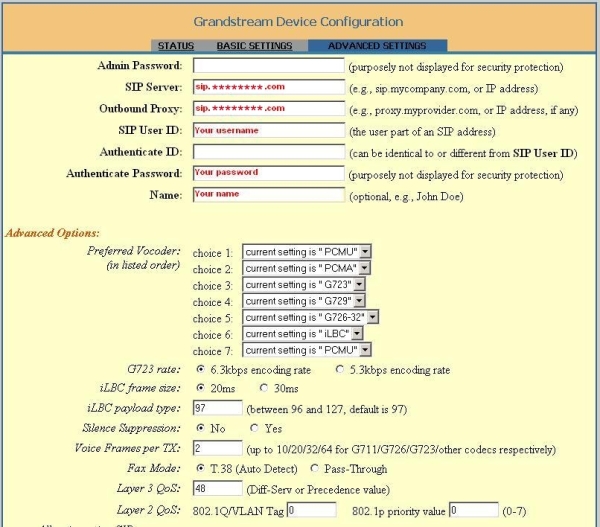
Fill in the following settings: -
SIP server : fill in sip.voipbuster.com
-
Outbound proxy : this is sip.voipbuster.com
-
SIP User ID : fill in your username, this is the username you used for the registration of your VoipBuster-account
-
Authenticate Password : your password, this is the password you used for the registration of your VoipBuster-account
-
Name : you can fill-in your name, this name will be displayed in the phone screen of the person you are calling
-
Don't change the Advanced Options
-
-
(click here to expand)GRANDSTREAM HT386
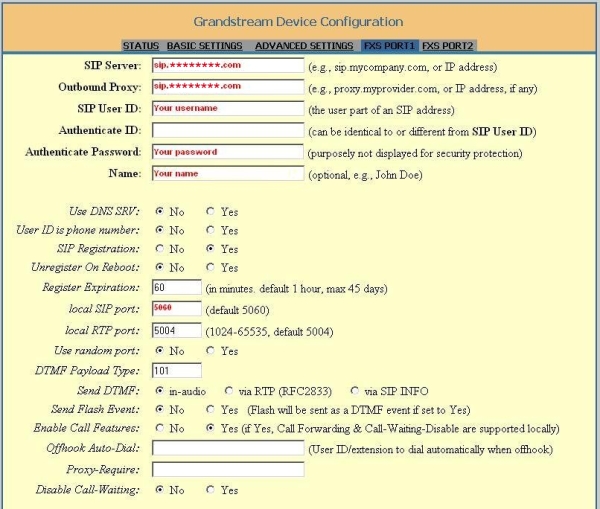
Fill in the following settings: -
SIP Server : fill in sip.voipbuster.com
-
Outbound Proxy : this is sip.voipbuster.com
-
SIP User ID : fill in your username, this is the username you used for the registration of your VoipBuster-account
-
Authenticate Password : your password, this is the password you used for the registration of your VoipBuster-account
-
Name : your name, this name will be displayed in the phone screen of the person you are calling
-
Local SIP port : fill in 5060
-
Don't change the other options
-
-
(click here to expand)GRANDSTREAM HT486
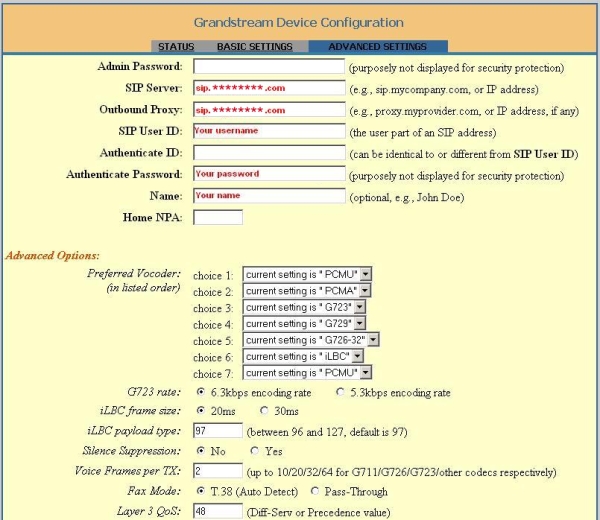
Fill in the following settings: -
SIP Server : fill in sip.voipbuster.com
-
Outbound Proxy : this is sip.voipbuster.com
-
SIP User ID : fill in your username, this is the username you used for the registration of your VoipBuster-account
-
Authenticate Password : your password, this is the password you used for the registration of your VoipBuster-account
-
Name : you can fill-in your name, this name will be displayed in the phone screen of the person you are calling
-
Don't change the Advanced Options
-
-
(click here to expand)GRANDSTREAM HT496
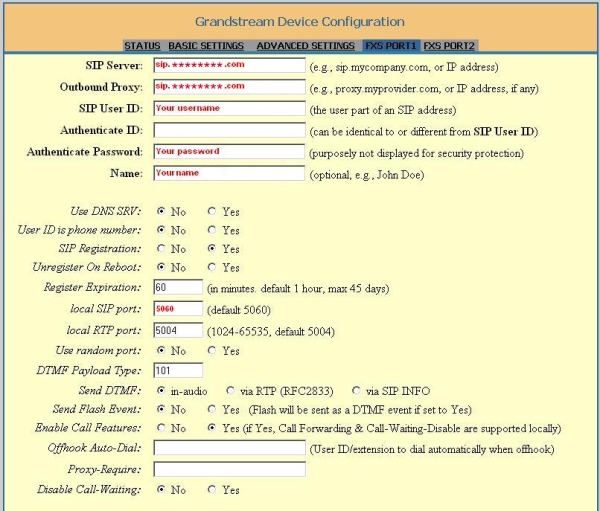
Fill in the following settings: -
SIP server : fill in sip.voipbuster.com
-
Outbound Proxy : this is sip.voipbuster.com
-
SIP User ID : fill in your username, this is the username you used for the registration of your VoipBuster-account
-
Authenticate Password : your password, this is the password you used for the registration of your VoipBuster-account
-
Name : your name, this name will be displayed in the phone screen of the person you are calling
-
Local SIP port : fill in 5060
-
Don't change the other options
-
-
(click here to expand)LINKSYS SPA3102
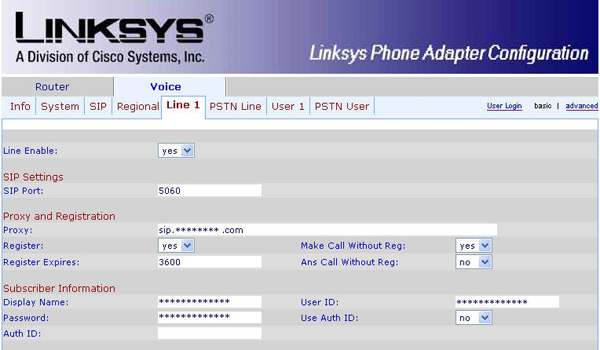
Fill in the following settings: -
Line Enable: Yes
-
SIP Port : portnumber 5060
-
Proxy: fill in sip.voipbuster.com
-
Register: this is 'Yes'
-
Make Call Without Reg: fill in 'Yes'
-
Register Expires: this is 3600 seconds
-
Ans Call Without Reg: fill in 'No'
-
Display name: you can fill-in your name, this name will be displayed in the phone screen of the person you are calling
-
User ID: fill in your username, this is the username you used for the registration of your VoipBuster-account
-
Password: fill in your password, this is the password you used for the registration of your VoipBuster-account
-
Use Auth ID: set to 'No'
-
-
(click here to expand)LINKSYS WIP330
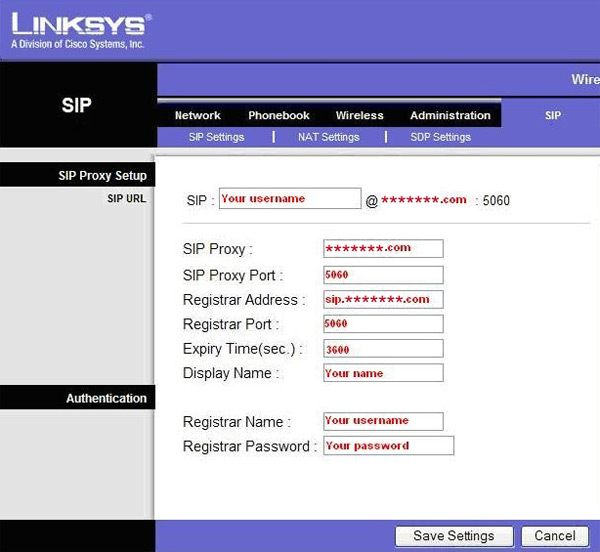
Fill in the following settings: -
SIP Proxy: fill in voipbuster.com
-
SIP Proxy Port: this is port number 5060
-
Registrar Address: this is sip.voipbuster.com
-
Registrar Port: this is port number 5060
-
Expiry Time(sec): this is 3600 seconds
-
Display name: you can fill-in your name, this name will be displayed in the phone screen of the person you are calling
-
Registrar Name: your username, this is the username you used for the registration of your VoipBuster-account
-
Registrar Password: your password, this is the password you used for the registration of your VoipBuster-account
-
-
(click here to expand)SIEMENS SX553
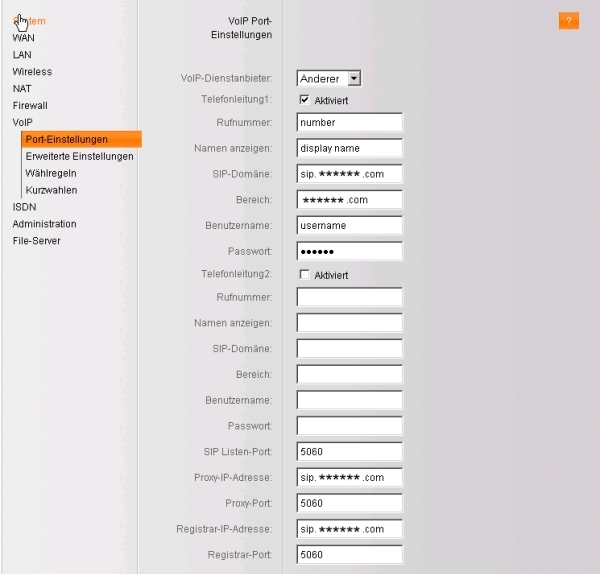
Fill in the following settings: -
Rufnummer : your VoipBuster username
-
Namen anzeigen : you can fill in your name
-
SIP-Domäne : fill in sip.voipbuster.com
-
Bereich : this is voipbuster.com
-
Benutzername : fill in your username, this is the username you used for the registration of your VoipBuster-account
-
Passwort : fill in your password, this is the password you used for the registration of you VoipBuster-account
-
SIP Listen-Port : this is port 5060
-
Proxy-IP-Adresse : fill in sip.voipbuster.com
-
Proxy-Port : this is port 5060
-
Registrar-IP-Adresse : sip.voipbuster.com
-
Registrar-Port : this is port 5060
-
-
(click here to expand)SMC 7908 VoWBRA
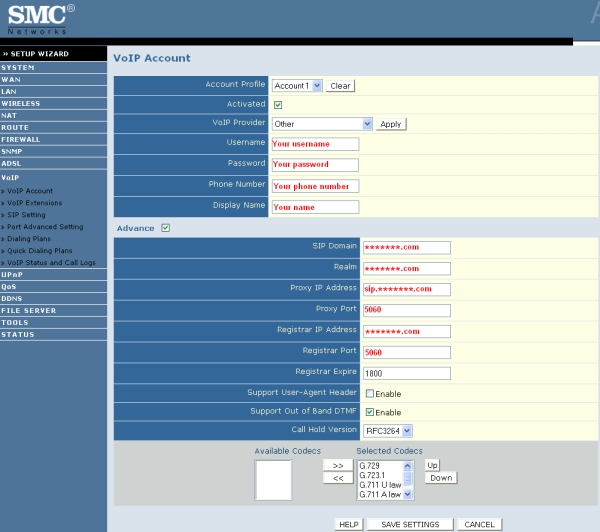
Fill in the following settings: -
Username : fill in your username, this is the username you used for the registration of your VoipBuster-account
-
Password : fill in your password, this is the password you used for the registration of your VoipBuster-account
-
Phone Number : your VoipBuster username
-
Display Name : you can fill in your name
-
SIP Domain : this is voipbuster.com
-
Realm : fill in voipbuster.com
-
Proxy IP Address : this is sip.voipbuster.com
-
Proxy Port : this is port 5060
-
Registrar IP Address : this is voipbuster.com
-
Registrar Port : this is port 5060
-
-
(click here to expand)X-lite v3.0 Software
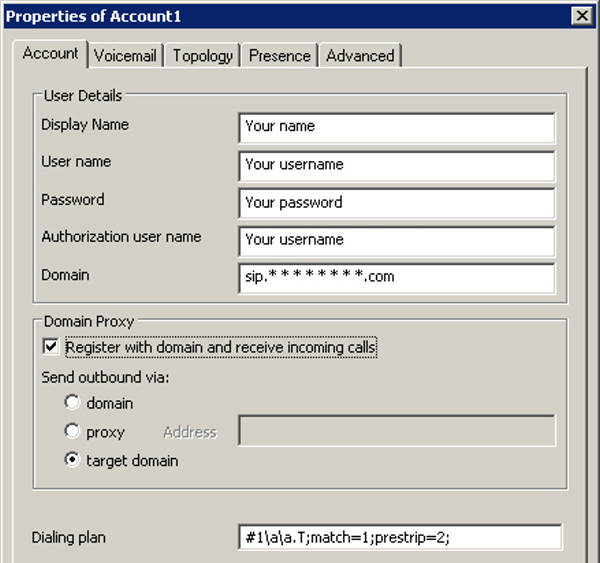
Fill in the following settings: -
Display Name : fill in your your name, this name will be displayed in the phone screen of the person you are calling
-
User name : fill in your username, this is the username you used for the registration of your VoipBuster-account
-
Password : fill in your your password, this is the password you used for the registration of your VoipBuster-account
-
Authorization user name : same as User name
-
Domain : fill in sip.voipbuster.com
-
-
(click here to expand)AVM Fritz!box FON ATA 1020
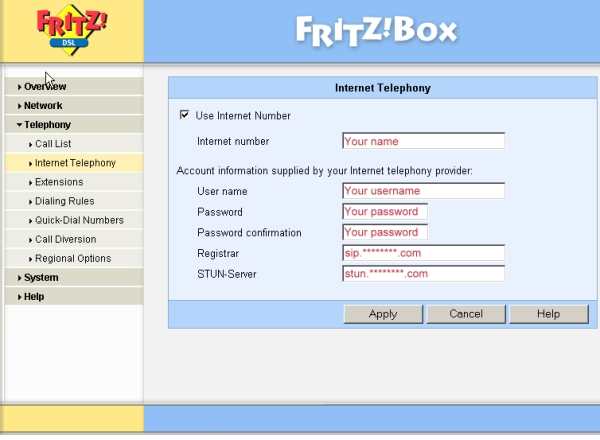
Fill in the following settings: -
Internet number: you can fill-in e.g. your name or telephone number
-
User name: fill in your username, this is the username you used for the registration of your VoipBuster-account
-
Password: fill in your password, this is the password you used for the registration of your VoipBuster-account
-
Password confirmation: fill in your password again
-
Registrar: this is sip.voipbuster.com
-
STUN-Server: this is stun.voipbuster.com
-












|
Codecs |
|
|
G.711 (64 kbps) |
|
G.726 (32 kbps) |
|
G.729 (8 kbps) |
|
G.723 (5.3 & 6.3 kbps) |
|
GSMFR (13.2 kbps) |
Si tiene problemas de sonido:
Use un servidor STUN (p. ej., stun.voipbuster.com) con el puerto 3478 (si su dispositivo lo soporta)
Use el códec G.711