Anleitung zu Nutzung mit Ihrem SIP Endgerät
Sie benötigen einen VoipBuster Benutzernamen und ein Passwort um über unser Netzwerk zu telefonieren. Deshalb melden Sie sich bitte zuerst an indem Sie die VoipBuster Anwendung downloaden, installieren und Ihre Zugangsdaten generieren.
Sie können VoipBusterr mit den folgenden SIP Endgerätgruppen nutzen::
- SIP ATA (Analog Telefon Adapter)
- SIP Router
- xDSL Modem
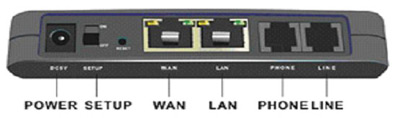
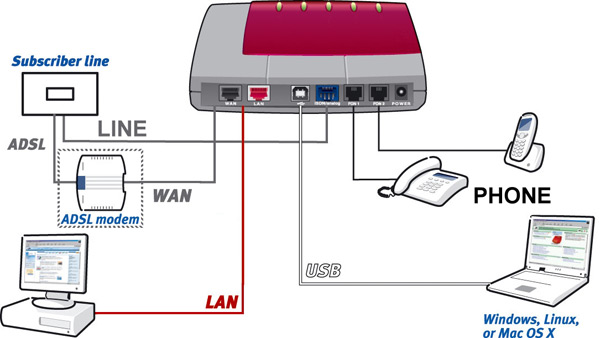
Die meisten Endgeräte sind mit einer Kombination aus folgenden Anschlüssen ausgestattet
(Dies ist lediglich eine Beispieldarstellung. Jedes Endgeräte kann unterschiedlich aussehen)
(Dies ist lediglich eine Beispieldarstellung. Jedes Endgeräte kann unterschiedlich aussehen)
- (A)DSL: Verbindung zum Anschluss des Kabels Ihres (A)DSL Anbieters (nicht verfügbar bei ATA)
- WAN: Verbindung zum Anschluss des Kabels Ihres xDSL Modem/Router
- LAN: Anschluss für Ihr (Heim-) Netzwerk . Hier können Sie z.B. Ihren PC, Ihren Laptop, Netzwerkdrucker oder Wireless Router anschließen
- PHONE: Hier können Sie Ihr analoges Telefon anschließen
- LINE: Verbindung zum Anschluss des Kabels Ihrer analogen Telefonleitung (PSTN)
- USB: Anschluss Ihres Computer/Laptop über freien USB Port
Einige SIP Endgeräte stellen mehr als einen LAN Port und/oder PHONE Port zur Verfügung.
Für die korrekte Verkabelung Ihres SIP Endgerätes schauen Sie bitte in die dem Gerät beiliegende Betriebsanleitung und lesen Sie die oben genannten Informationen genau durch. Nach dem Ihr Endgerät korrekt angeschlossen wurde müssen Sie sicherstellen, dass alle benötigten Programme (Software) korrekt installiert sind.
Softwarereinstellungen
Allgemein |
|
|---|---|

|
SIP port : 5060 |
|
|
Registrar : sip.voipbuster.com |
|
|
Proxy server : sip.voipbuster.com |
|
|
Outbound proxy server : leave empty |
|
Account name : your VoipBuster username |
|
Password : your VoipBuster password |
|
Display name/number : your VoipBuster username or voipnumber |
|
Stunserver (option) : stun.voipbuster.com |
|
ONLY select codec G711 a-Law as active codec. All other available codecs should NOT be selected as active. |
Nachfolgend einige Beispiele der Software Einstellungen der meistgenutzten SIP Endgeräte. Bitte sehen Sie auf jeden Fall auch in das Handbuch, welches Ihrem Endgerät beiliegt.
-
(click here to expand)AVM Fritz!box FON 7050
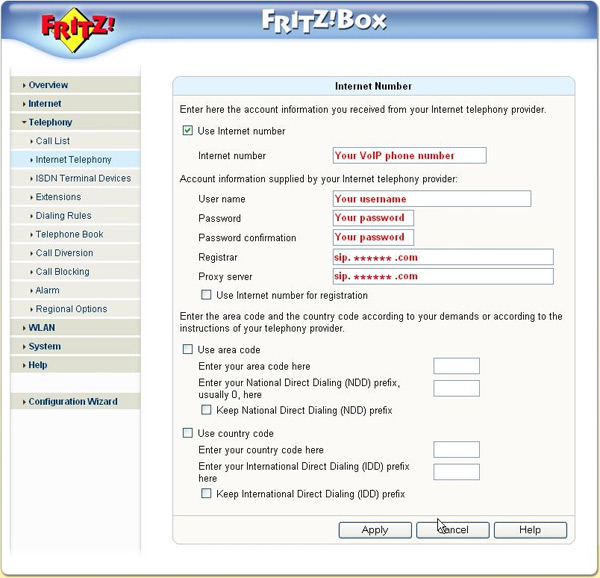
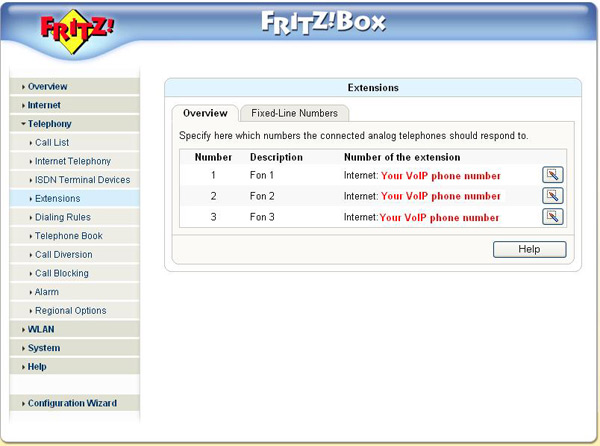
Fill in the following settings: -
 Internet number: your VoipBuster username (if available)
 -
User Name: fill in your username, this is the username you used for the registration of your VoipBuster-account
-
Password: fill in your password, this is the password you used for the registration of your VoipBuster-account
-
Password confirmation: fill in your password again
-
Registrar: this is sip.voipbuster.com
-
Proxy server: this is sip.voipbuster.com
-
Overview - number 1, 2 or 3: your VOIP phone number (if available)
-
-
(click here to expand)GRANDSTREAM HT286
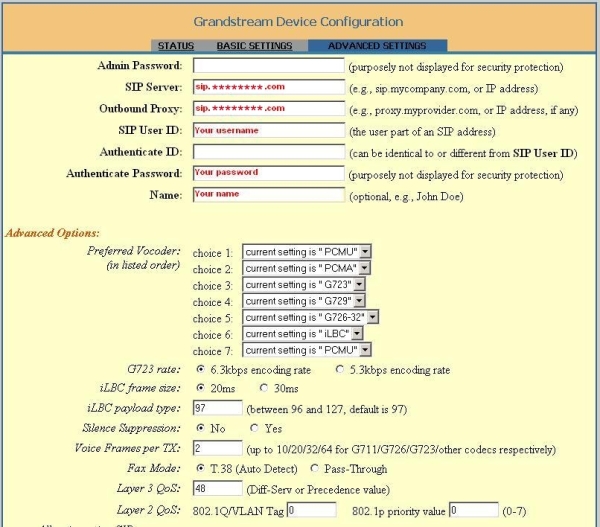
Fill in the following settings: -
SIP server : fill in sip.voipbuster.com
-
Outbound proxy : this is sip.voipbuster.com
-
SIP User ID : fill in your username, this is the username you used for the registration of your VoipBuster-account
-
Authenticate Password : your password, this is the password you used for the registration of your VoipBuster-account
-
Name : you can fill-in your name, this name will be displayed in the phone screen of the person you are calling
-
Don't change the Advanced Options
-
-
(click here to expand)GRANDSTREAM HT386
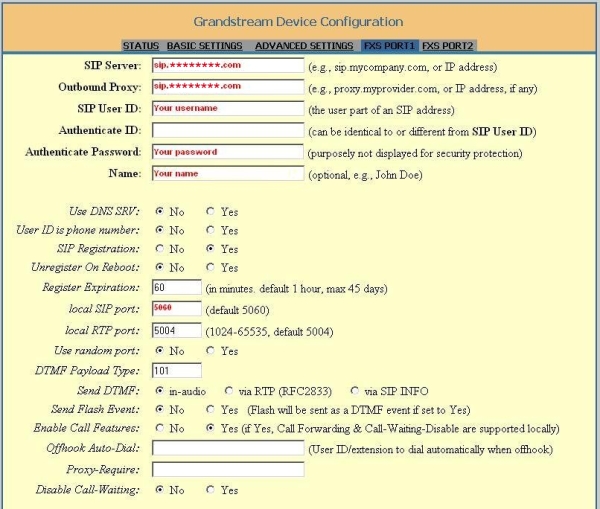
Fill in the following settings: -
SIP Server : fill in sip.voipbuster.com
-
Outbound Proxy : this is sip.voipbuster.com
-
SIP User ID : fill in your username, this is the username you used for the registration of your VoipBuster-account
-
Authenticate Password : your password, this is the password you used for the registration of your VoipBuster-account
-
Name : your name, this name will be displayed in the phone screen of the person you are calling
-
Local SIP port : fill in 5060
-
Don't change the other options
-
-
(click here to expand)GRANDSTREAM HT486
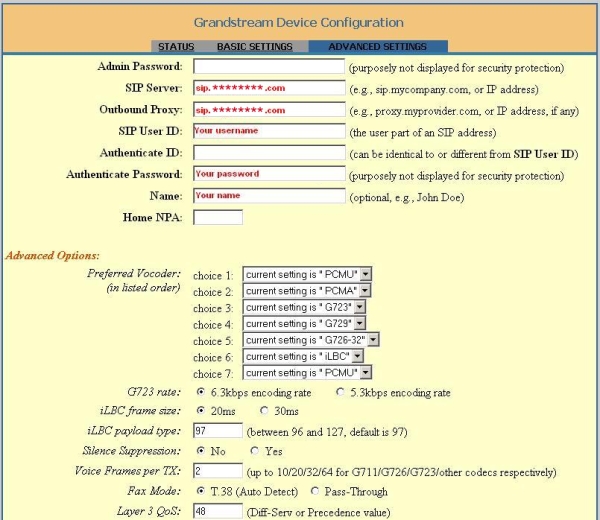
Fill in the following settings: -
SIP Server : fill in sip.voipbuster.com
-
Outbound Proxy : this is sip.voipbuster.com
-
SIP User ID : fill in your username, this is the username you used for the registration of your VoipBuster-account
-
Authenticate Password : your password, this is the password you used for the registration of your VoipBuster-account
-
Name : you can fill-in your name, this name will be displayed in the phone screen of the person you are calling
-
Don't change the Advanced Options
-
-
(click here to expand)GRANDSTREAM HT496
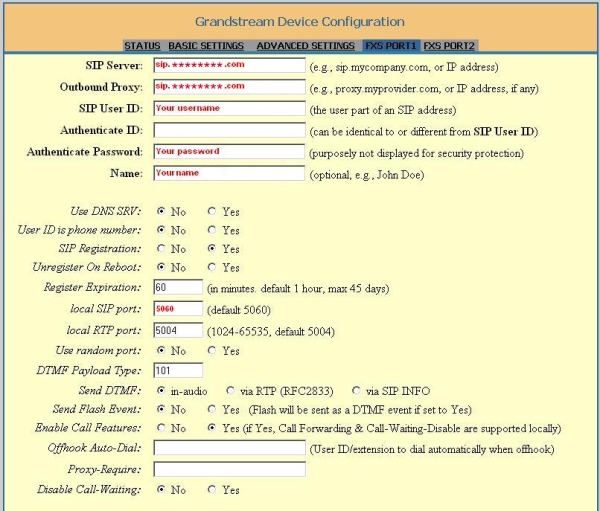
Fill in the following settings: -
SIP server : fill in sip.voipbuster.com
-
Outbound Proxy : this is sip.voipbuster.com
-
SIP User ID : fill in your username, this is the username you used for the registration of your VoipBuster-account
-
Authenticate Password : your password, this is the password you used for the registration of your VoipBuster-account
-
Name : your name, this name will be displayed in the phone screen of the person you are calling
-
Local SIP port : fill in 5060
-
Don't change the other options
-
-
(click here to expand)LINKSYS SPA3102
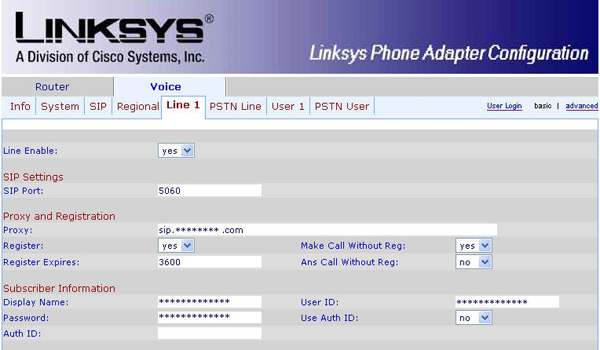
Fill in the following settings: -
Line Enable: Yes
-
SIP Port : portnumber 5060
-
Proxy: fill in sip.voipbuster.com
-
Register: this is 'Yes'
-
Make Call Without Reg: fill in 'Yes'
-
Register Expires: this is 3600 seconds
-
Ans Call Without Reg: fill in 'No'
-
Display name: you can fill-in your name, this name will be displayed in the phone screen of the person you are calling
-
User ID: fill in your username, this is the username you used for the registration of your VoipBuster-account
-
Password: fill in your password, this is the password you used for the registration of your VoipBuster-account
-
Use Auth ID: set to 'No'
-
-
(click here to expand)LINKSYS WIP330
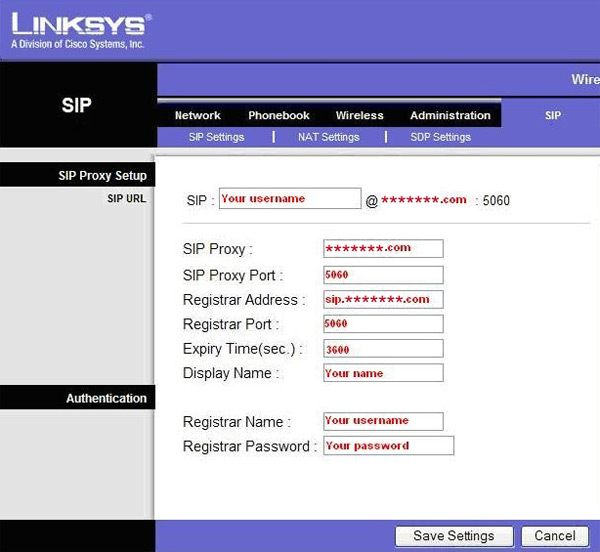
Fill in the following settings: -
SIP Proxy: fill in voipbuster.com
-
SIP Proxy Port: this is port number 5060
-
Registrar Address: this is sip.voipbuster.com
-
Registrar Port: this is port number 5060
-
Expiry Time(sec): this is 3600 seconds
-
Display name: you can fill-in your name, this name will be displayed in the phone screen of the person you are calling
-
Registrar Name: your username, this is the username you used for the registration of your VoipBuster-account
-
Registrar Password: your password, this is the password you used for the registration of your VoipBuster-account
-
-
(click here to expand)SIEMENS SX553
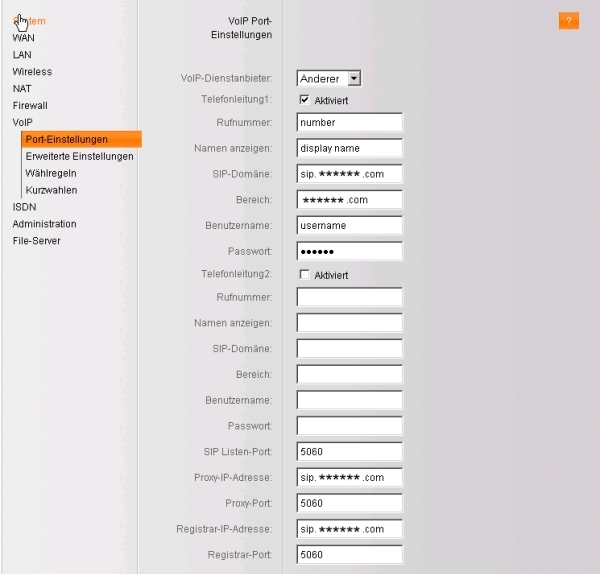
Fill in the following settings: -
Rufnummer : your VoipBuster username
-
Namen anzeigen : you can fill in your name
-
SIP-Domäne : fill in sip.voipbuster.com
-
Bereich : this is voipbuster.com
-
Benutzername : fill in your username, this is the username you used for the registration of your VoipBuster-account
-
Passwort : fill in your password, this is the password you used for the registration of you VoipBuster-account
-
SIP Listen-Port : this is port 5060
-
Proxy-IP-Adresse : fill in sip.voipbuster.com
-
Proxy-Port : this is port 5060
-
Registrar-IP-Adresse : sip.voipbuster.com
-
Registrar-Port : this is port 5060
-
-
(click here to expand)SMC 7908 VoWBRA
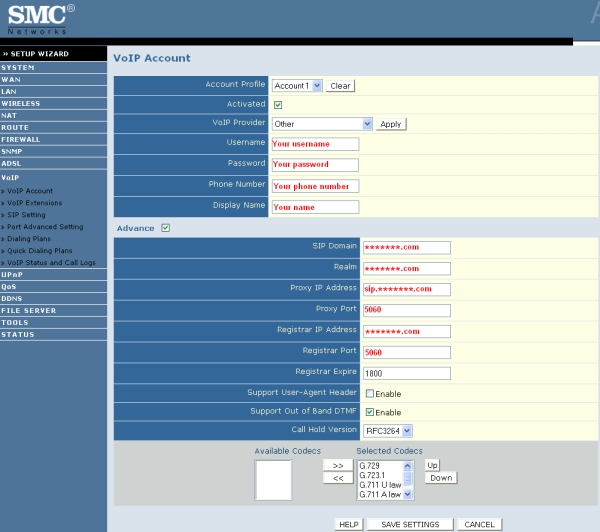
Fill in the following settings: -
Username : fill in your username, this is the username you used for the registration of your VoipBuster-account
-
Password : fill in your password, this is the password you used for the registration of your VoipBuster-account
-
Phone Number : your VoipBuster username
-
Display Name : you can fill in your name
-
SIP Domain : this is voipbuster.com
-
Realm : fill in voipbuster.com
-
Proxy IP Address : this is sip.voipbuster.com
-
Proxy Port : this is port 5060
-
Registrar IP Address : this is voipbuster.com
-
Registrar Port : this is port 5060
-
-
(click here to expand)X-lite v3.0 Software
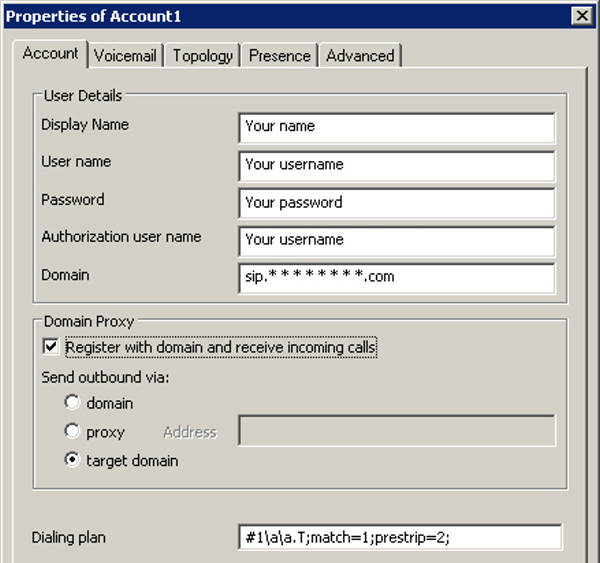
Fill in the following settings: -
Display Name : fill in your your name, this name will be displayed in the phone screen of the person you are calling
-
User name : fill in your username, this is the username you used for the registration of your VoipBuster-account
-
Password : fill in your your password, this is the password you used for the registration of your VoipBuster-account
-
Authorization user name : same as User name
-
Domain : fill in sip.voipbuster.com
-
-
(click here to expand)AVM Fritz!box FON ATA 1020
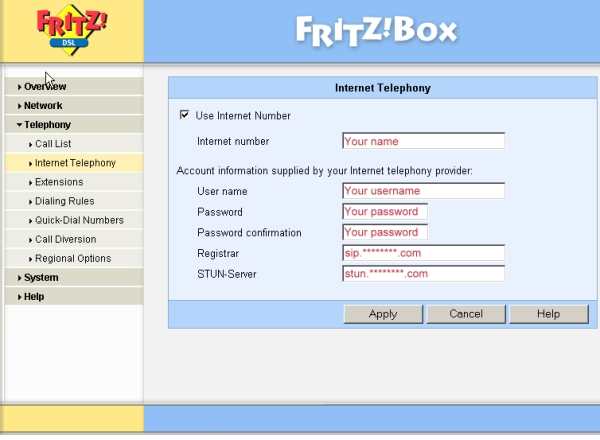
Fill in the following settings: -
Internet number: you can fill-in e.g. your name or telephone number
-
User name: fill in your username, this is the username you used for the registration of your VoipBuster-account
-
Password: fill in your password, this is the password you used for the registration of your VoipBuster-account
-
Password confirmation: fill in your password again
-
Registrar: this is sip.voipbuster.com
-
STUN-Server: this is stun.voipbuster.com
-












|
Codecs |
|
|
G.711 (64 kbps) |
|
G.726 (32 kbps) |
|
G.729 (8 kbps) |
|
G.723 (5.3 & 6.3 kbps) |
|
GSMFR (13.2 kbps) |
Falls Audio Probleme auftreten:
Nutzen Sie bitte einen STUN Server (e.g. stun.voipbuster.com) unter Port 3478 (falls von Ihrem Endgerät unterstützt)
Nutzen Sie bitte den G.711 codec